uRex Video Converter Platinum

uRex Video Converter Platinum

trusted
DOWNLOAD 10.05 MB
0 
2.0
This program received 3 awards
Questions & answers
Wiki
Suggest a correction

Video tutorial & screenshots

  • Preferences Screen
  • Main Screen
  • Setup Wizard
  • Main Screen
  • About Window
  • Options Window
  • Output Settings
  • Adding Effects
  • Crop Videos

Editorial review

Comments

Pedro Castro Senior editor

Reviewed: 23 Jan 2013

The following review written by one of the Software Informer contributors applies to version 3.1
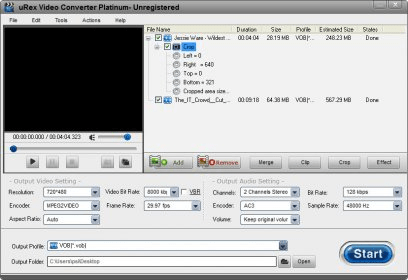
uRex Video Converter Platinum allows you to re-encode audio and video files. The application’s interface is very similar to those of other batch converters, but it also has various small changes introduced for your convenience.
The application supports an extensive number of input formats, both video and audio, and allows batch conversion.

Besides converting media files, the program allows you to do basic editing as well. For instance, you can add visual effects, such as mosaic, blur, noise, old film, emboss; and tweak picture parameters. You can also trim videos by selecting the start and end points of the desired segment (it does not allow you to extract more than one segment from the same source video, however). Unfortunately, operations like watermarking and adding subtitles, which are available in other similar applications, are not supported.

The range of output formats is as extensive as the number of input formats. They are categorized according to their supported devices, which is a great help for inexperienced users. Expert users can enter custom parameters, but those cannot be saved for later use. It's especially disappointing since the application allows setting individual conversion parameters for each file.

All in all, uRex Video Converter Platinum is a decent conversion tool. As it is free to try, you can easily check whether it works for you.

Pros

  • It is easy to use.
  • It has an attractive interface.
  • It supports batch conversion.
  • It supports a wide range of output and input formats.
  • It allows performing various editing actions.

Cons

  • It does not allow extracting more than a segment from the same source video.
  • It does not support watermarking and adding subtitles.
This software was checked for viruses 23 days ago and was found to be clean. Click here to see antivirus report.
trusted
DOWNLOAD 10.05 MB
 

Publisher's description

uRex Video Converter offers excellent quality, abundant formats and fast HD video conversion. It is a powerful and professional video converting solution which can convert almost all the popular video formats on your PC to various formats like AVI, MPEG, WMV, DivX, MP4, H.264/AVC, AVCHD, MKV, RM, MOV, XviD, 3GP, just to name a few and audio MP3, WMA, WAV, RA, M4A, AAC, AC3, OGG. Also, it makes you to enjoy movie on your PSP, PS3, iPod, iPhone, Apple TV, Xbox, Google phones, iPad, iPad2 and other digital multimedia devices with ease. With this amazing video converter, you can conveniently convert all HD (High-definition) videos such as MKV, AVCHD (M2TS, MTS), TOD, MOD to iPhone/iPad, MOV, AVI, MP4, MPEG, VOB, etc without any assistance of third-party codec and no quality lose. It extracts audio from video and convert it to any popular audio formats like WMA, MP3, M4A, AAC, OGG, MKA, FLAC, etc. You can also capture your favorite scenes from video and save it in BMP, JPG image formats. Also, it easily splits a large file into several smaller ones according to split duration or size or merge several smaller clips together to create a new video if necessary.

Leave a comment


loading
Download Software Informer Client